 Neel Thakkar
When businesses implement Salesforce, one of the most important decisions they face is whether to rely on standard features or invest in customization. This choice may seem technical at first, but it directly impacts how effectively your CRM supports your business goals. From cost and implementation speed to long-term scalability, every aspect of your Salesforce journey depends on this decision.
In 2026, with increasing demand for automation, integration, and personalized customer experiences, businesses can no longer afford to make the wrong choice. Understanding when to use standard Salesforce features and when to customize is essential for maximizing ROI, improving team productivity, and building a system that truly aligns with your operations.
What Are Standard Salesforce Features?

- Standard features are pre-built functionalities designed based on industry best practices. They allow businesses to start quickly without heavy development or technical complexity.
- These features cover core CRM needs such as lead management, opportunity tracking, and reporting, making them ideal for most businesses.
- They come ready-to-use within Salesforce, which means businesses can simply configure settings instead of building everything from scratch.
- Implementation is faster because everything is already available within Salesforce, requiring only configuration instead of coding.They are cost-effective since businesses avoid development expenses and reduce dependency on technical resources.
- Standard features are highly scalable and can support business growth without immediate need for customization in early stages.Maintenance is simple, as Salesforce handles updates automatically without breaking existing functionality.
- Regular platform updates ensure that businesses always have access to the latest features, security enhancements, and performance improvements.
- Standard features ensure stability and reliability because they are tested across thousands of organizations globally.
- They follow Salesforce’s proven data models and workflows, which helps businesses align with industry standards and best practices.
- Built-in security and compliance features make them suitable for organizations that need to manage sensitive customer data securely.
- They are best suited for businesses with straightforward processes that do not require deep customization.Teams can quickly adopt these features due to their intuitive interface and familiar CRM structure, improving overall user productivity.
What Is Salesforce Customization?
- Customization involves modifying Salesforce to fit specific business needs that standard features cannot address. This can include both configuration and custom development.
- Businesses can create custom objects, workflows, and user interfaces to align the system with their unique processes.It allows organizations to design a CRM that reflects their exact operational flow instead of adjusting their processes to fit the system.

- Advanced customization includes using Apex code and Lightning Web Components to build tailored functionality.Developers can create dynamic and interactive user experiences that improve usability and team productivity.
- Customization enables automation of complex processes such as multi-level approvals, conditional workflows, and exception handling.
- It allows seamless integration with third-party systems like ERP, marketing tools, or payment gateways.
- Businesses can connect Salesforce with external platforms to ensure smooth data flow across departments and systems.
- Custom dashboards and reports can be built to provide deeper insights based on specific business metrics and KPIs.
- Customization provides flexibility, enabling businesses to design workflows exactly as required.
- It helps organizations gain a competitive advantage by supporting unique business models and innovative processes.
- It is ideal for organizations with complex operations or industry-specific requirements.Customization also supports scalability, allowing businesses to expand functionalities as they grow.
- However, it requires skilled developers and proper planning to avoid long-term maintenance challenges.Poorly managed customization can lead to technical debt, making upgrades and future changes more difficult.
Standard Features vs Customization: Key Differences
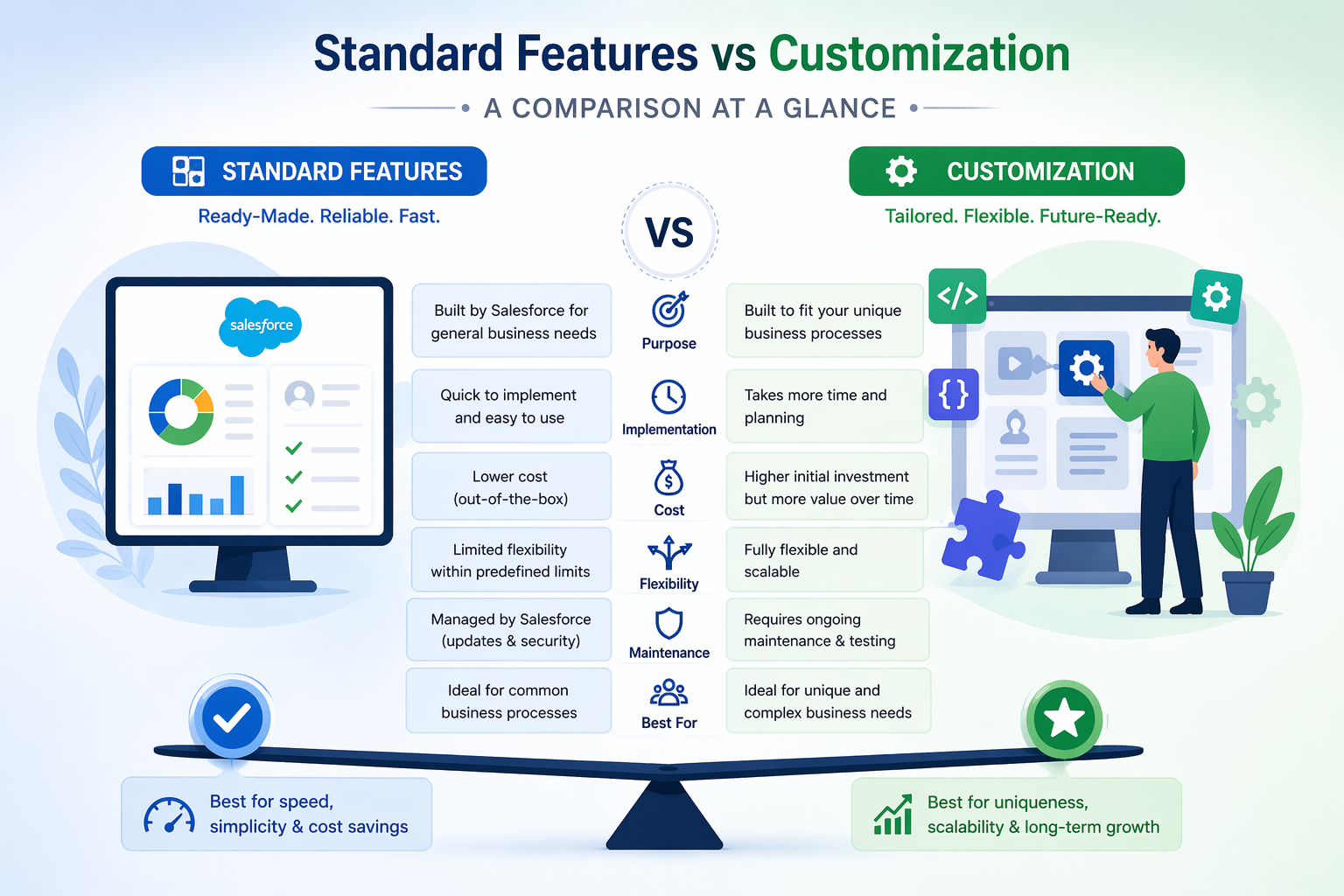
- Standard features offer quick implementation, while customization requires more time due to development and testing.
- Businesses can go live faster with standard features, whereas customization involves planning, coding, and validation phases.
- The cost of standard features is significantly lower compared to customization, which involves development effort.
- Customization increases initial investment but can deliver higher long-term value when aligned with business needs.
- Customization provides greater flexibility, allowing businesses to create highly tailored solutions.
- Standard features are limited to predefined capabilities, while customization removes those limitations.
- Standard features are easier to maintain, while customized systems may require ongoing technical support.
- Custom-built solutions need regular monitoring to ensure compatibility with Salesforce updates.
- Scalability is higher with customization, especially for growing and complex organizations.
- Standard features can scale to a certain level, but customization supports advanced expansion and evolving requirements.
- Standard features carry lower risk, whereas customization can introduce complexity if not managed properly.
- Poorly executed customization can impact system performance and create technical challenges over time.
- Standard features follow Salesforce best practices, while customization depends heavily on implementation quality.
- Customization allows deeper integration with external systems, while standard features have limited integration capabilities.
- User adoption is generally higher with standard features due to simplicity, while customization may require additional training.
- Choosing the right balance between the two is critical for long-term success.
- A strategic approach ensures businesses get the benefits of both without unnecessary complexity or cost.
Common Mistakes Businesses Make
1. Over-Customization Without Evaluation
Jumping into customization without exploring standard Salesforce features often leads to unnecessary complexity and effort.
2. Rebuilding Existing Features
Creating functionalities that already exist in Salesforce wastes time, increases cost, and adds no real value.
3. Lack of Clear Strategy
Without a defined implementation roadmap, systems become disorganized with disconnected workflows and inconsistent processes.
4. Ignoring Scalability
Customization without future planning can create issues during upgrades and limit long-term growth.
5. Overcomplicating the System
Excessive customization can make the system difficult to use, reducing user adoption and overall efficiency.
6. Feature-Focused Approach
Focusing only on features instead of outcomes leads to poor business impact and low ROI.
7. Lack of Expert Guidance
Not involving experienced professionals early can result in poor decisions, rework, and increased technical debt.
8. Poor Documentation & Maintenance
Failing to document customizations makes future updates, troubleshooting, and scaling more difficult.
9. Ignoring User Adoption
Lack of training and change management results in underutilization of the system.
10. Replicating Legacy Systems
Trying to copy old systems instead of optimizing processes limits innovation and efficiency.
How to Avoid These Mistakes
1. Start with Standard Features
Evaluate built-in Salesforce capabilities first before deciding on customization.
2. Define Clear Requirements
Focus on essential business needs instead of adding unnecessary features.
3. Follow a Hybrid Approach
Adopt a “standard first, customize later” strategy for better efficiency and cost control.
4. Work with Experts
Engage experienced Salesforce consultants to ensure the right implementation approach.
5. Plan for Scalability
Design systems that can grow smoothly without major rework in the future.
6. Focus on Business Outcomes
Prioritize features that directly improve productivity, efficiency, and ROI.
7. Test and Optimize Regularly
Continuously review system performance and alignment with business goals.
When Should You Use Standard Features?

- Standard features are the right choice when your business processes are straightforward and closely match common CRM workflows.
- They are ideal if you need a quick implementation to start operations or evaluate the capabilities of Salesforce without delays.
- Businesses with budget constraints can benefit from standard functionality, as it reduces the need for additional development costs.
- If you are looking for a system that is easy to manage and does not require ongoing technical support, standard features are a practical option.
- They are well-suited for organizations that want to follow industry best practices without adding unnecessary complexity to their CRM.
- Startups and small businesses often rely on standard features during their early growth stages, as they provide all essential capabilities.
- This approach is also effective when immediate flexibility or advanced customization is not a priority.
- When your team is new to Salesforce, standard features offer a user-friendly experience that supports faster onboarding and adoption.
- If your goal is to achieve faster time-to-value and begin seeing results quickly, standard features help accelerate deployment.
- They are appropriate when your business does not depend on complex integrations with external systems.
- Standard dashboards and reports are sufficient if your analytics and reporting needs are relatively simple.
- Using standard features helps reduce implementation risks and avoids complications during future system upgrades.
- Organizations that prefer a clean, structured, and consistent system will benefit from the simplicity of standard features.
- They are also a good fit when your strategy is to scale gradually without making significant upfront investments in customization.
When Should You Customize Salesforce?
- Customization becomes essential when your business processes are unique and cannot be effectively supported by standard Salesforce features.
- It is the right approach when your organization requires complex workflows, such as multi-level approvals or advanced automation.
- Businesses that need to integrate Salesforce with external systems like ERP platforms, marketing tools, or legacy applications should consider customization.

- If your teams require a more tailored user experience to improve efficiency and productivity, customization can provide the necessary flexibility.
- Customization is beneficial when your reporting and data structure requirements go beyond standard capabilities.
- Organizations operating in specialized industries often need customization to align Salesforce with industry-specific processes and compliance requirements.
- It is a suitable choice when your business is scaling and requires advanced functionality to support growing operations.
- Customization allows you to build solutions that provide a competitive advantage by supporting unique business models.
- If standard features create limitations or inefficiencies in your workflows, customization helps eliminate those gaps.
- Businesses aiming for deeper automation and reduced manual work can benefit significantly from customized solutions.
- Customization is also important when you need to centralize data from multiple systems into a single platform.
- It enables better control over how data is captured, processed, and utilized across the organization.
- However, customization should always be planned carefully to ensure long-term maintainability and system performance.
- A strategic approach to customization ensures that you achieve flexibility without introducing unnecessary complexity.
What Is the Hybrid Approach in Salesforce and Why Is It the Best Strategy?
- The hybrid approach in Salesforce focuses on using standard features as a foundation and applying customization only where it adds real business value.
- This strategy allows businesses to achieve faster implementation while keeping initial costs under control.
- By starting with standard functionality, organizations can better understand their workflows before deciding where customization is truly needed.
- It helps identify gaps through real usage, enabling more accurate and targeted customization decisions.
- The hybrid approach maintains system simplicity while still supporting unique and complex business requirements.
- It reduces the risk of over-customization, which can lead to higher maintenance costs and system complexity.
- Businesses can prioritize high-impact customizations instead of investing in unnecessary features.
- This approach improves user adoption, as teams can start with a simpler system and gradually adapt to enhancements.
- It ensures better scalability, allowing the CRM to evolve alongside business growth and changing needs.
- Organizations can continuously optimize their system based on user feedback and performance insights.
- The hybrid model balances cost, flexibility, and efficiency, making it suitable for businesses of all sizes.
- It also supports smoother upgrades, as minimal customization reduces the chances of compatibility issues.
- This approach aligns with long-term CRM success by combining stability with adaptability.
- It is widely recommended by Salesforce experts as a best practice for building efficient, scalable, and future-ready CRM systems.
How Does the Right Approach Impact Business ROI?

- Using the right approach helps reduce implementation costs and improves overall budget efficiency. By avoiding unnecessary customization, businesses can allocate resources more effectively and focus on high-impact areas.
- Faster deployment leads to quicker returns on investment and faster business outcomes. When systems are implemented efficiently, teams can start using Salesforce earlier and generate value without delays.
- Simplified systems improve user adoption, leading to better team productivity. When users find the system easy to understand and use, they are more likely to engage with it consistently and effectively.
- Customization, when done correctly, enhances automation and reduces manual effort. This allows teams to focus on strategic tasks rather than repetitive processes, improving overall efficiency.
- Businesses can achieve better decision-making through improved data and reporting. Accurate and well-structured data provides valuable insights that support smarter and faster business decisions.
- Avoiding over-customization ensures long-term cost savings and easier upgrades. A cleaner system reduces maintenance effort and minimizes the risk of issues during Salesforce updates.
- A balanced approach ultimately maximizes the value of your Salesforce investment. It ensures that businesses achieve both short-term results and long-term scalability without unnecessary complexity.
Conclusion
Choosing between standard features and customization in Salesforce is not about picking one, but selecting the right approach based on your business needs. Standard features provide a strong, cost-effective foundation with faster implementation, while customization adds the flexibility required for complex processes. The goal is to balance both for maximum efficiency and long-term value.
Businesses that succeed focus on keeping their CRM simple, scalable, and aligned with growth. By starting with standard features and customizing only where necessary, organizations can avoid complexity, improve adoption, and build a system that evolves smoothly over time.